

Introduction
In the decimal (denary) number system, we use base-10, which means each digit can take one of ten values from 0 to 9. As we move from right to left, each digit becomes ten times larger than the digit to its right.
Similarly, as we move from left to right beyond the decimal point, each digit becomes ten times smaller than the digit to its left. This creates fractional numbers.
Decimal Fraction Review
In decimal numbers, digits to the left of the decimal point have positive powers of 10, and digits to the right have negative powers of 10.

(d_n × 10^n) + … + (d_1 × 10^1) + (d_0 × 10^0) + (d_{-1} × 10^{-1}) + (d_{-2} × 10^{-2})
Example:
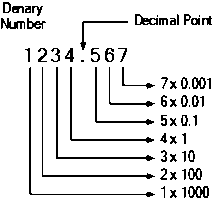

1234.567
Expanded form:
(1×10³) + (2×10²) + (3×10¹) + (4×10⁰) + (5×10⁻¹) + (6×10⁻²) + (7×10⁻³)
= 1000 + 200 + 30 + 4 + 0.5 + 0.06 + 0.007
= 1234.567
Binary Fractions
The binary number system uses base-2. It has only two digits:
- 0
- 1
Just like decimal fractions, binary numbers can also have fractional parts. The only difference is that the positional weights are powers of 2 instead of 10.
Binary Fraction Positional Weights
Digits to the left of the binary point use positive powers of 2:
2³, 2², 2¹, 2⁰
Digits to the right use negative powers of 2:
2⁻¹, 2⁻², 2⁻³, 2⁻⁴ …
(d_n × 2^n) + … + (d_1 × 2^1) + (d_0 × 2^0) + (d_{-1} × 2^{-1}) + (d_{-2} × 2^{-2})
Example 1: Convert Binary Fraction to Decimal
Convert 0.1011₂ to decimal.
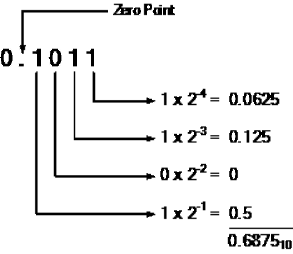

Expand using positional weights:
(1×2⁻¹) + (0×2⁻²) + (1×2⁻³) + (1×2⁻⁴)
= 0.5 + 0 + 0.125 + 0.0625
= 0.6875₁₀
Example 2: Convert 1101.0111₂ to Decimal
Expand using powers of 2:
(1×2³) + (1×2²) + (0×2¹) + (1×2⁰) + (0×2⁻¹) + (1×2⁻²) + (1×2⁻³) + (1×2⁻⁴)
= 8 + 4 + 0 + 1 + 0 + 0.25 + 0.125 + 0.0625
= 13.4375₁₀
More Binary Fraction Examples
1. 0.11₂
= (1×2⁻¹) + (1×2⁻²) = 0.5 + 0.25 = 0.75₁₀
2. 11.001₂
= (1×2¹) + (1×2⁰) + (1×2⁻³) = 2 + 1 + 0.125 = 3.125₁₀
3. 1011.111₂
= 8 + 2 + 1 + 0.5 + 0.25 + 0.125 = 11.875₁₀
Converting Decimal to Binary Fraction
To convert a decimal number with a fractional part to binary, we treat the integer and fractional parts separately.
Step 1: Convert the Integer Part (Division Method)
Example: Convert 118₁₀ to binary.
118 ÷ 2 = 59 remainder 0
59 ÷ 2 = 29 remainder 1
29 ÷ 2 = 14 remainder 1
14 ÷ 2 = 7 remainder 0
7 ÷ 2 = 3 remainder 1
3 ÷ 2 = 1 remainder 1
1 ÷ 2 = 0 remainder 1
Reading remainders from bottom to top:
118₁₀ = 1110110₂
Step 2: Convert the Fractional Part (Multiplication Method)
Example: Convert 0.8125₁₀ to binary.
0.8125 × 2 = 1.625 → carry 1
0.625 × 2 = 1.25 → carry 1
0.25 × 2 = 0.5 → carry 0
0.5 × 2 = 1.0 → carry 1
Reading carries from top to bottom:
0.8125₁₀ = 0.1101₂
Example 3: Convert 54.6875₁₀ to Binary
Integer Part (54)
54 ÷ 2 = 27 remainder 0
27 ÷ 2 = 13 remainder 1
13 ÷ 2 = 6 remainder 1
6 ÷ 2 = 3 remainder 0
3 ÷ 2 = 1 remainder 1
1 ÷ 2 = 0 remainder 1
Binary integer = 110110₂
Fractional Part (0.6875)
0.6875 × 2 = 1.375 → carry 1
0.375 × 2 = 0.75 → carry 0
0.75 × 2 = 1.5 → carry 1
0.5 × 2 = 1.0 → carry 1
Binary fraction = 0.1011₂
Final Answer:
54.6875₁₀ = 110110.1011₂
Important Notes
- Digits to the right of the binary point use negative powers of 2.
- The integer part always gives an exact binary result.
- The fractional part may result in a repeating binary fraction.
- Conversion requires division for integers and multiplication for fractions.
Summary
Binary fractions work exactly like decimal fractions, except they use powers of 2 instead of powers of 10.
- Use division by 2 for integer conversion.
- Use multiplication by 2 for fractional conversion.
- Negative powers of 2 represent fractional binary values.
Understanding binary fractions is essential in digital electronics, computer architecture, floating-point representation, and data processing systems.