

Introduction
The User Datagram Protocol (UDP) is a core member of the Internet Protocol suite in computer networking. Computer applications use UDP to send messages, called datagrams, to other hosts on an IP network. No prior communication is required to establish a connection.
UDP follows a simple, connectionless communication model with minimal protocol mechanisms. It includes a checksum for basic data integrity and uses port numbers to identify applications. However, it does not provide guaranteed delivery, ordering, or duplication protection. When error correction is required, protocols like TCP or SCTP are used instead.
UDP Architecture
Although TCP provides reliable communication, it comes with higher overhead and latency. UDP is preferred in situations where performance is critical and occasional data loss is acceptable, such as online gaming, video conferencing, and real-time communication.


As UDP does not perform extensive error checking, it saves bandwidth and enables faster transmission. In terms of latency and efficiency, UDP performs better than TCP.
UDP Header
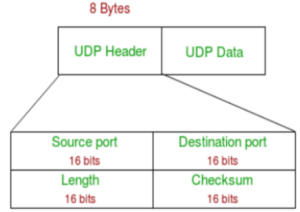
The UDP header is a fixed 8-byte structure, much smaller than the TCP header (20–60 bytes). Each port number field is 16 bits long and ranges from 0 to 65535. Port number 0 is reserved. These port numbers help identify specific processes.
- Source Port: Identifies the sender’s port
- Destination Port: Identifies the receiver’s port
- Length: Length of header + data
- Checksum: Verifies data integrity
Working of UDP
UDP sends data packets directly to the destination without establishing a connection. These packets are called datagrams. Unlike TCP, UDP does not arrange packet order or confirm successful delivery.
TCP uses a handshake process and resends lost packets, but UDP simply sends the data. This results in much faster transmission but with a risk of data loss, duplication, or reordering. Therefore, applications using UDP must tolerate these imperfections.
Features of UDP
- Transport Layer Protocol: Works at the transport layer and provides best-effort delivery.
- Connectionless: No need to establish a virtual connection.
- No Sequencing: Packets may arrive out of order.
- Ports: Uses port numbers ranging from 0—1023 for well-known services.
- Faster Transmission: Has lower latency due to no handshaking.
- No Acknowledgement: The sender does not receive confirmation of delivery.
- Stateless: Each packet is handled independently.
Why Do We Use UDP?
UDP is ideal for applications where speed is more important than reliability. Acknowledgement packets consume significant bandwidth, especially in video streaming. Occasional packet loss has little impact on the user experience, making UDP efficient for such tasks.
Difference Between TCP and UDP
| Feature | TCP | UDP |
|---|---|---|
| Connection | Connection-oriented | Connectionless |
| Sequencing | Supports sequencing | Does not support sequencing |
| Delivery Guarantee | Guaranteed delivery | No delivery guarantee |
| Retransmission | Possible | Not available |
| Error Checking | Extensive | Basic only |
| Speed | Slower | Faster |
| Broadcasting | Not supported | Supported |
| Usage | HTTP, HTTPS, Email, FTP | Streaming, VoIP, Gaming, DNS |
Advantages of UDP
- Faster than TCP due to low overhead
- Ideal for multicast and broadcast communication
- Small header size (8 bytes)
- Best for continuous data flow applications
Disadvantages of UDP
- No reliability or guaranteed delivery
- No congestion or flow control
- Loss of data is possible
- No retransmission of lost packets
Applications of UDP
- Video streaming and live broadcasting
- VoIP (Voice over IP)
- Online multiplayer games
- Domain Name System (DNS)
- Time-critical applications
- Multicasting services