

Introduction
As modern applications and devices become an essential part of homes and businesses, software reliability has become critically important. Software failures can lead to severe consequences. For example, on April 16, 1994, a China Airlines aircraft crash caused the loss of 250 lives, largely due to software bugs that were not adequately tested.
It is impossible to develop completely bug-free software. However, system failures caused by software defects can be minimized through effective software testing. Software testing is the process of evaluating a system to detect errors, assess quality, and ensure reliability before release. There are two primary types of software testing: manual testing and automation testing.

What is Automation Testing?
Automation testing is a software testing technique in which test cases are executed automatically using tools, scripts, and frameworks. It involves running pre-written test scripts to compare actual outcomes with expected results.
Automation testing is widely used for repetitive tasks and for testing load, stress, and performance conditions. For example, large-scale platforms like social media and AI-based systems rely heavily on automation testing to ensure performance and stability.
Test Cases That Should Be Automated First
- Repeated Tasks: Login testing on e-commerce websites executed multiple times.
- Result Capturing and Reporting: Automated tools generate reports instead of manual data analysis.
- Data Entry Tests: Automation helps manage large datasets efficiently.
- Response Timing or Waiting Conditions: Automated scripts handle delays using “wait until” commands.
- Non-Functional Testing: Load and stress testing are best performed using automation tools.
Automation Testing Process
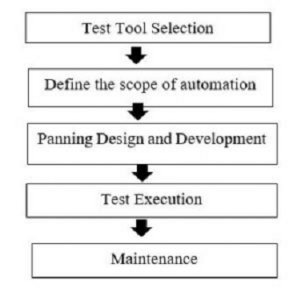
1. Tool Selection
Choosing the right automation tool is critical and depends on application type, technology stack, and testing requirements such as GUI, code-driven, or process-based testing.
2. Define Automation Scope
The automation scope includes test cases with large datasets, reusable functionality, cross-platform compatibility, and complex workflows.
3. Test Design and Development
Test cases are broken down into smaller units, converted into scripts, and grouped into test suites. These scripts are executed sequentially using automation frameworks.
4. Test Execution
Test scripts are executed using automation tools, and detailed test reports are generated for analysis and future reference.
5. Maintenance
Automation scripts must be updated regularly to match application changes. Maintenance ensures long-term reliability and effectiveness of automation.
Approaches to Automation Testing
1. Code-Driven Approach
This approach focuses on testing application logic and code behavior. It is widely used in Agile development environments.
2. GUI-Based Testing
Graphical User Interface testing records and replays user actions. Tools like Selenium are commonly used, supporting languages such as Java, Python, and C#.
3. Framework-Based Approach
This approach uses reusable libraries, test data, and modules, reducing maintenance costs and improving efficiency.
Types of Automation Frameworks
- Linear Scripting Framework
- Data-Driven Framework
- Keyword-Driven Framework
- Modular Testing Framework
- Hybrid Testing Framework
Types of Automation Testing
1. Unit Testing
Individual components or modules are tested separately during development.
2. Smoke Testing
Smoke testing verifies basic functionality and build stability before detailed testing begins.
3. Functional Testing
This ensures application features work as expected, such as login authentication.
4. Integration Testing
Multiple modules are integrated and tested together to ensure proper interaction.
5. Regression Testing
Regression testing ensures that new updates do not affect existing functionality.
How to Choose Automation Testing Tools
- Platform and environment support
- Database testing capability
- Object and image recognition
- Error recovery features
- Multiple framework support
- Cost efficiency
- Detailed test reporting
Types of Automation Testing Tools
Selenium
An open-source tool widely used for web application testing across browsers and platforms.
Watir
A Ruby-based open-source tool for web testing with support for major browsers.
Ranorex
A comprehensive GUI testing tool supporting C# and .NET applications.
API Testing
Used to validate APIs for functionality, security, performance, and reliability.
Mobile Automation Testing Tools
- Appium
- Robotium
- MonkeyRunner
- UI Automator
- Selendroid
- Calabash
- Testdroid
Risks of Automation Testing
- High initial investment
- Automation is not error-free
- UI changes require frequent updates
- Incorrect time and effort estimation
- Tool compatibility issues
Advantages of Automation Testing
- Faster test execution
- Improved test accuracy
- Reduced human error
- Time and cost efficient
- Reusable test scripts