

Introduction
A fingerprint scanner is a biometric device used to identify and authenticate individuals based on their unique fingerprint patterns. It is widely used in laptops, smartphones, and security systems for secure access and data protection.
Uses of Fingerprint Scanner
Fingerprint scanners are commonly used for authentication and security purposes. For example, if you forget your password on a device, a fingerprint scanner allows you to access your system without needing to reset credentials.
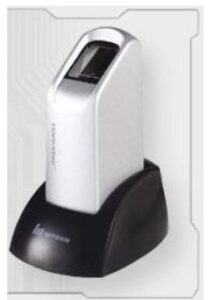
USB fingerprint scanner
These devices can also store login information such as usernames and passwords. Once your fingerprint is registered, you can simply scan your finger to automatically log in to websites or applications.
- User authentication and login access
- Password management and autofill
- Data protection and device security
- Access control systems
History of Fingerprint Scanners
Fingerprint identification has been used since the late 1800s. Sir Francis Galton introduced the concept of unique fingerprint features known as “Galton points.” These features became the basis for fingerprint identification.
In 1969, the FBI initiated the development of automated fingerprint identification systems. Collaborating with the National Institute of Standards and Technology (NIST), advanced techniques were developed for scanning, matching, and storing fingerprint data. The first working prototype was introduced in 1975.
Understanding Fingerprints
Fingerprints are unique patterns formed by ridges and valleys on the skin. No two individuals, not even identical twins, have the same fingerprints. The uniqueness of fingerprints comes from:
- Ridge patterns and flow
- Minutiae points (ridge endings and bifurcations)
- Genetic factors (DNA)
These features are used to identify individuals accurately.
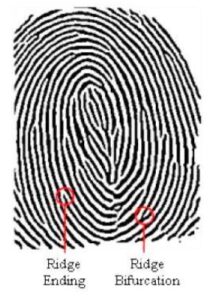
USB fingerprint scanner
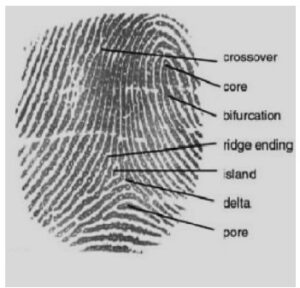
Fingerprint Characteristics
Working of Fingerprint Scanner
Fingerprint scanners capture an image of the fingerprint and compare it with stored data to verify identity. The process involves:
- Scanning the fingerprint
- Converting it into a digital image
- Extracting unique features
- Matching with stored fingerprint data
This process uses complex algorithms to ensure accuracy and security.
Types of Fingerprint Scanners
1. Optical Scanner
Optical scanners use light to capture an image of the fingerprint. A glass plate is used where the user places their finger. Light reflects differently from ridges and valleys, creating a digital image.
- Ridges appear darker due to higher reflection
- Valleys appear lighter due to lower reflection
The captured image is processed and compared with stored data for identification.
2. Capacitive Scanner
Capacitive scanners use electrical signals to capture fingerprint details. These scanners contain an array of tiny capacitors that detect variations in electrical charge caused by ridges and valleys.
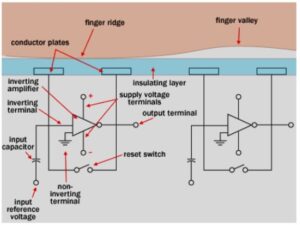
When a finger touches the sensor, the capacitance changes based on the distance between the skin and the sensor. These variations are used to create a highly accurate fingerprint image. Capacitive scanners are more secure and harder to deceive compared to optical scanners.
Advantages of Fingerprint Scanner
- Provides secure and reliable authentication
- Unique identification for each individual
- Cannot be easily forgotten like passwords
- No need to carry physical identity cards
Disadvantages of Fingerprint Scanner
- Can be spoofed using fake fingerprints in some cases
- Cannot be changed if compromised
- May fail due to dirt, cuts, or moisture on fingers
- Privacy concerns related to biometric data storage
Applications of Fingerprint Scanner
- Smartphones and laptops
- Banking and financial systems
- Law enforcement and criminal identification
- Attendance and access control systems
- Immigration and border security
Conclusion
Fingerprint scanners are one of the most widely used biometric technologies for secure authentication. Their accuracy, convenience, and reliability make them an essential part of modern security systems. Despite some limitations, ongoing advancements continue to improve their performance and security.