
Introduction
An Operating System (OS) is system software that acts as an interface between the user and the computer hardware. It performs essential tasks such as memory management, file management, input/output handling, security, process management, job accounting, error detection, system performance control, and peripheral device management (such as printers and disk drives). Popular operating systems include Microsoft Windows, Linux, AIX, VMS, and z/OS. This article explains what an operating system is and discusses its major components.
What is an Operating System (OS)?
An operating system is a large and complex software system that is divided into smaller components through well-defined interfaces. These components work together to manage hardware resources such as files, memory, input/output devices, and processes. The OS is the most important program in a computer because every application depends on it to function. Its main tasks include:
- Accepting input from devices such as keyboards
- Sending output to display devices
- Managing files and storage drives
- Controlling peripheral devices
- Managing system resources efficiently
Components of Operating System
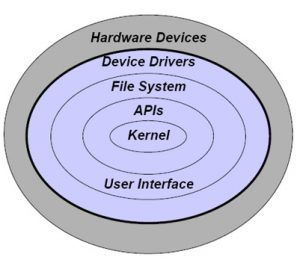
The components of an operating system work together to ensure smooth functioning of the computer system. The main components are discussed below.
1. Kernel
The kernel is the core component of an operating system. It provides fundamental control over computer hardware and peripherals.
- It loads first when the system starts.
- It remains in main memory (RAM).
- It manages CPU, memory, and device access.
- It controls system resources for optimal performance.
2. Process Execution
The OS allows programs to execute by acting as a bridge between hardware and application software. When a program runs, the OS creates a process and allocates memory and other resources to it. The kernel ensures that each process gets the required resources and executes efficiently.
3. Interrupt Handling
Interrupts are signals sent by hardware devices or software programs to the CPU, requesting attention from the operating system. When an interrupt occurs:
- The current process is paused.
- The system saves its current state.
- The OS executes a specific interrupt service routine.
Interrupts help the OS respond quickly to external events.
4. Memory Management
Memory management is responsible for managing the main memory (RAM). It allocates and deallocates memory to processes as needed.
- Keeps track of memory usage
- Allocates memory to processes
- Moves processes between disk and RAM
- Ensures efficient memory utilization
Memory management can be categorized into:
- Hardware memory management
- Operating system memory management
- Application memory management
5. Multitasking
Multitasking allows multiple programs to run simultaneously on a computer system. Most operating systems use time-sharing, where each program receives a small time slice of the CPU. This creates the illusion that programs are running at the same time.
6. Networking
Networking enables computers to communicate and share resources over wired or wireless connections. Operating systems support various networking features such as:
- Data routing
- Connection management
- Security and access control
- Resource sharing (printers, scanners, data)
Modern OS platforms allow systems running different operating systems to connect and share resources.
7. Security
Security is essential in multi-user systems. The operating system ensures that processes and users are protected from unauthorized access.
- User authentication
- Access control
- Data protection
- Security auditing
The OS determines which requests are allowed and which should be denied.
8. User Interface (UI)
The User Interface allows users to interact with the operating system. There are two main types of user interfaces:
- CLI (Command Line Interface): Users type commands using a keyboard.
- GUI (Graphical User Interface): Users interact using icons, windows, and menus.
The UI enables users to provide input and receive output efficiently.
Conclusion
An operating system is essential for managing computer hardware and software resources. It controls memory, processes, security, networking, and user interaction. Without an operating system, a computer cannot function effectively. Therefore, understanding the components of an OS is crucial for students and professionals in computer science and related fields.