

Introduction
Bluetooth is a well-established wireless technology used to provide short-range connectivity between devices such as wireless headphones, mobile phones, laptops, keyboards, mice, and many other electronic devices. Over time, Bluetooth has evolved significantly and is now widely used not only for audio streaming but also in machine-to-machine (M2M) communication and IoT mesh networking.
This technology offers flexibility, low power consumption, reliable data transfer, and improved speed, making it suitable for modern wireless applications.
What is Bluetooth Technology?
Bluetooth technology is a high-speed, low-power wireless communication standard used to connect portable and fixed devices without using physical cables. It is defined under IEEE standard 802.15.1 and operates in the unlicensed Industrial, Scientific, and Medical (ISM) band at 2.4 GHz.

Bluetooth devices typically support a communication range of up to 10 meters (30 feet). The technology uses low-cost transceivers and supports data transfer rates of up to 721 kbps along with multiple voice channels. Bluetooth allows up to eight devices to connect simultaneously, where each device has a unique 48-bit address defined by the IEEE standard. Connections can be established in point-to-point or point-to-multipoint modes.
History of Bluetooth
The name Bluetooth originates from Harald “Bluetooth” Blåtand, a Danish Viking king who united Denmark and Norway—symbolizing how Bluetooth technology unites different electronic devices.
Bluetooth technology was developed in 1994 by Ericsson Mobile Communications as an alternative to wired communication between mobile phones and accessories. In 1998, Ericsson, IBM, Nokia, and Toshiba formed the Bluetooth Special Interest Group (SIG). The first Bluetooth specification was released in 1999.
Bluetooth versions evolved as follows:
- Bluetooth 1.2 – 1 Mbps
- Bluetooth 2.0 + EDR – 3 Mbps
- Bluetooth 3.0 + HS – 24 Mbps
- Bluetooth 4.0 – Low Energy (BLE)
Bluetooth Connections
Bluetooth devices are generally secure and reliable due to the use of Frequency Hopping Spread Spectrum (FHSS). Devices switch frequencies hundreds of times per second, reducing interference and improving security. Bluetooth is commonly used to connect mobile devices, printers, keyboards, mice, and headsets. Bluetooth and Wi-Fi can operate simultaneously without significant interference.
How Bluetooth Works
A Bluetooth network is known as a Personal Area Network (PAN) or piconet. It consists of one master device and up to seven active slave devices. The master device controls communication and timing, while slave devices synchronize with the master. Data transmission is managed through time slots, and slaves can transmit data only when permitted by the master.
The frequency hopping sequence is determined by the master’s Bluetooth device address. When a device participates in more than one piconet, a scatternet is formed.
Bluetooth Architecture
Piconet
A piconet consists of one master device and up to seven active slave devices within a range of approximately 10 meters. Communication occurs only between the master and slaves. Additionally, a piconet can support up to 255 parked devices that remain inactive until promoted to active status.
Scatternet
A scatternet is formed by interconnecting multiple piconets. A device can act as a slave in one piconet and a master in another, serving as a bridge node between networks.
Types of Bluetooth Devices
Bluetooth Headsets
Bluetooth headsets allow hands-free calling and voice communication without physical cables.
Stereo Headphones
Wireless stereo headphones enable music streaming from Bluetooth-enabled devices such as smartphones and laptops.
In-Car Bluetooth Systems
These systems connect mobile phones to vehicle audio systems for hands-free calling.
Bluetooth Printers
Bluetooth-enabled printers allow wireless printing from laptops, tablets, and smartphones.
Bluetooth Webcam
Wireless webcams provide flexibility and mobility without wired connections.
GPS Tracking Devices
Bluetooth-enabled GPS devices support voice commands and wireless data communication.
Bluetooth Keyboard
Bluetooth keyboards connect wirelessly to computers, tablets, and smartphones.
Bluetooth Specifications
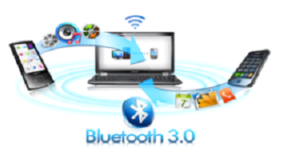

Bluetooth specifications are divided into two main categories:
- Core Specifications: Define the Bluetooth protocol stack and testing requirements.
- Profile Specifications: Define usage models for various Bluetooth applications.
Bluetooth Protocol Stack Layers
- Radio Layer: Defines frequency, modulation, and transmission power.
- Baseband Layer: Manages packet structure, timing, and frequency hopping.
- Link Manager Protocol (LMP): Handles link setup and management.
- L2CAP: Adapts higher-layer protocols to baseband.
- Service Discovery Protocol (SDP): Allows devices to discover services.
Bluetooth Security
Bluetooth uses encryption and authentication mechanisms to ensure secure communication. Devices frequently change frequencies to reduce the risk of attacks. Security settings allow users to control trusted devices and restrict service-level access.
Common Bluetooth security threats include:
- Bluesnarfing: Unauthorized data access.
- Bluebugging: Full control of a device by an attacker.
Bluetooth Versions and Features
- Bluetooth 1.0 – Basic hardware support
- Bluetooth 1.1 – IEEE 802.15.1-2002
- Bluetooth 1.2 – Faster device discovery
- Bluetooth 2.0 + EDR – Enhanced data rate
- Bluetooth 2.1 – Secure simple pairing
- Bluetooth 3.0 – High-speed transfer
- Bluetooth 4.0 – Low energy consumption
How to Connect Bluetooth to a Smartphone
- Ensure the Bluetooth device is fully charged.
- Turn on Bluetooth on your smartphone.
- Enable pairing mode on the Bluetooth device.
- Select the device from the available list.
- Enter the PIN if required.
Troubleshooting Tips
- Restart both devices and retry pairing.
- Ensure batteries are fully charged.
- Confirm device compatibility.
- Check the effective operating range.
Advantages of Bluetooth
- Low power consumption
- Secure communication with encryption
- Supports data and voice transmission
- No line-of-sight required
- Minimal interference due to frequency hopping
Applications of Bluetooth
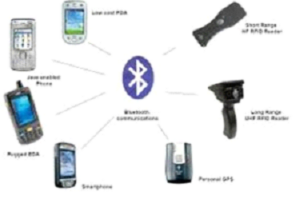

- Wireless peripherals (keyboard, mouse, printer)
- Hands-free communication
- Automatic device synchronization
- Multimedia data transfer
- IoT and smart devices