
Introduction
Data communication refers to the exchange of digital data between computers. A computer network allows two or more computers to communicate with each other using wired or wireless media.
One major drawback of a traditional Local Area Network (LAN) is that it broadcasts data to all devices within the same network, which increases congestion and consumes bandwidth. To overcome this limitation, a Virtual Local Area Network (VLAN) is used.
What is Virtual LAN?
A Virtual Local Area Network (VLAN) is a logical network that allows multiple LANs to be created using a single physical switch. It enables communication between different VLANs without requiring separate physical networking devices such as routers. The main purpose of a VLAN is to reduce network congestion, improve security, and manage network traffic efficiently.
LAN Architecture
Consider an organization with three departments: Group 1, Group 2, and Group 3. If these groups should not communicate with each other, separate switches are required. To enable inter-department communication, a router must be added, increasing both cost and maintenance.
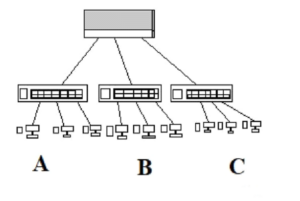
VLANs operate at the Data Link Layer (Layer 2) of the OSI model. Devices are logically segmented at Layer 2, while routing between VLANs occurs at Layer 3.
VLAN Tagging Methods
When data reaches a switch, it is tagged with VLAN identification. This tagging helps determine the source VLAN of the packet.
- Explicit Tagging: The switch inserts a VLAN ID into the data frame.
- Implicit Tagging: VLAN membership is determined using port numbers, MAC addresses, or IP addresses.
The IEEE 802.1Q standard is currently used for VLAN implementation.
Types of VLAN Membership
1. Port-Based VLAN
In this type, VLAN membership is determined by the physical port of the switch. It operates at Layer 1 of the OSI model. Whenever a device moves to a new port, the VLAN must be reconfigured manually.
2. MAC Address-Based VLAN
Here, VLAN membership is assigned based on the MAC address of the workstation. Although it provides flexibility, it becomes difficult to manage as the number of users increases.
3. Protocol-Based VLAN
This VLAN type assigns networks based on protocols at Layer 2. For example, IP traffic can be assigned to VLAN 1 and IPX traffic to VLAN 2.
Virtual LAN in Computer Networks
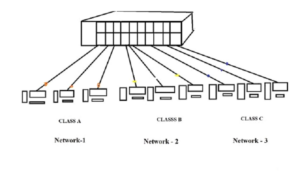
Consider a network with three departments. If communication is required only between Department 1 and Department 2, VLANs can be configured to isolate Department 3 while allowing selective communication.
Types of Links in Virtual LAN
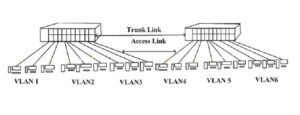
There are three types of links used in VLANs:
1. Access Link
An access link connects end devices such as PCs directly to a switch. Devices connected through an access link are unaware of VLAN existence.
2. Trunk Link
A trunk link carries traffic for multiple VLANs between switches. It uses tagged frames and reduces the need for routers between switches.
3. Hybrid Link
A hybrid link combines access and trunk links. It supports both tagged and untagged frames and carries traffic for known and unknown VLANs.
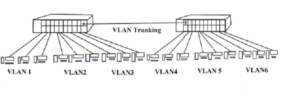
VLAN Trunking
When multiple VLAN-enabled switches are connected, the receiving switch must identify the source VLAN of incoming traffic. This process is known as VLAN Trunking.
Difference Between LAN and VLAN
| LAN | VLAN |
|---|---|
| Configuration is done only on PCs | Configuration is done on both switch and PCs |
| Ports cannot be logically configured | Every switch port can be configured |
| Router is required for inter-network communication | No router is required for VLAN communication |
| Single broadcast domain | Each VLAN has its own broadcast domain |
| High network traffic | Reduced network traffic |
| High network cost | Lower network cost |
VLAN Trunking Protocol (VTP)
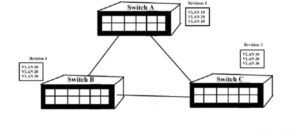
VTP allows switches to synchronize VLAN configurations automatically. Instead of configuring VLANs manually on each switch, VLANs are created on one switch and shared across the network.
VTP Messages
Summary Advertisements
These messages contain the VLAN revision number and are sent every five minutes to ensure database synchronization.
Subset Advertisements
Sent when VLAN updates occur, containing complete VLAN information.
Advertisement Requests
Used when a switch detects a higher revision number and requests database updates.
VTP Modes of Operation
- Server Mode: Creates VLANs and advertises updates.
- Client Mode: Receives VLAN updates but cannot create VLANs.
- Transparent Mode: Does not participate in VTP but forwards updates.
VTP Pruning
VTP pruning prevents unnecessary broadcast traffic by blocking VLAN traffic on trunk links that do not require it, saving bandwidth.
Requirements for VTP
- All links must be trunk links
- Same VTP domain name
- Optional VTP password
Advantages of Virtual LAN
- Reduced broadcast traffic
- Improved network security
- Lower network cost
- Efficient bandwidth utilization
- Physical layer transparency
Disadvantages of Virtual LAN
- Complex configuration
- Requires skilled network management
- Higher initial setup overhead
Applications of Virtual LAN
- Ethernet networks
- Asynchronous Transfer Mode (ATM)
- Fiber Distributed Data Interface (FDDI)
- Production networks
- VoIP systems