
Introduction
WiFi technology is a wireless networking system that allows devices to connect to the internet without using cables or wires. It uses radio waves to transmit data between devices such as computers, smartphones, and routers. WiFi has become an essential part of modern communication, enabling internet access in homes, offices, and public places.
Working Principle of WiFi Technology
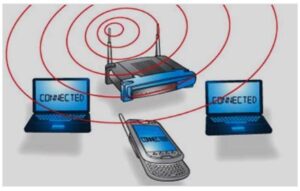
WiFi operates using three main components: radio signals, antennas, and routers. A wireless router receives data from the internet and converts it into radio signals. These signals are transmitted through antennas and received by WiFi-enabled devices such as laptops and mobile phones.

WIFI Technology
WiFi cards installed in devices read these signals and establish a connection to the internet. The speed and strength of the connection depend on the distance between the device and the router. The closer the device is to the router, the stronger and faster the connection.
WIFI Connections
Features of WiFi Technology
- Provides wireless internet access without cables
- Allows mobility within a specific coverage area
- Easy to set up and configure
- Widely available in public places such as hotels, airports, and cafes
WiFi Connections and Hotspots
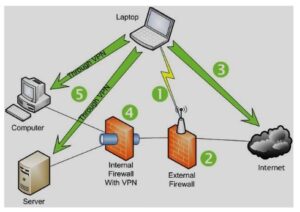
Most modern laptops and smartphones come with built-in WiFi capability. Users can connect to available networks by entering a username and password if required. Many cities now offer public WiFi hotspots, which are access points that provide internet connectivity in locations such as restaurants, airports, offices, and universities.
Security in WiFi Technology
Security is an important aspect of WiFi networks. Unsecured networks can allow unauthorized users to access personal data or misuse internet connections. Therefore, it is important to secure WiFi networks using passwords and encryption methods.
How to Secure a WiFi Network
- Access the router settings through its web interface
- Enable security protocols such as WEP, WPA, or WPA2
- Set a strong and unique password
- Regularly update security settings
What is a Wireless Router?
A wireless router is a hardware device that connects to the internet and distributes the connection wirelessly to multiple devices. It acts as the central hub of a wireless network and combines the functions of a router and a wireless access point.
WiFi Router for Desktop
Desktop WiFi routers are commonly used to provide wireless internet access in homes and offices. These routers transmit signals within a certain range. If the distance increases, the signal strength decreases. To overcome this limitation, range extenders are used to expand coverage.
Mobile Hotspot / WiFi Hotspot
A mobile hotspot allows a smartphone to share its internet connection with other devices. Portable WiFi hotspots are also available, which use cellular networks to provide internet access anywhere. These are useful for users who need internet connectivity while traveling.
Types of WiFi Technologies
- 802.11a: Operates at higher frequencies and offers faster speeds with shorter range.
- 802.11b: Provides speeds up to 11 Mbps and operates at 2.4 GHz frequency.
- 802.11g: Offers speeds up to 54 Mbps and better range than 802.11a.
- 802.11n: Uses multiple antennas for higher speed (up to 100 Mbps) and improved signal strength.
Elements of WiFi Technology
Wireless Access Point
A wireless access point connects wireless devices to a network and extends the coverage area. It allows multiple users to access the network simultaneously.
WiFi Cards
WiFi cards, also known as adapters, enable devices to send and receive wireless signals. These can be internal or external components.
Safeguards
Security tools such as firewalls and antivirus software protect networks from unauthorized access and ensure data safety.
Limitations of WiFi Technology
- Limited coverage range
- Interference from devices like microwaves and telephones
- High power consumption
- Security risks if not properly protected
Advantages of WiFi Technology
- Provides wireless mobility
- Reduces the need for cables
- Easy installation and configuration
- Convenient internet access through hotspots
- Supports multiple devices
Disadvantages of WiFi Technology
- Possible health concerns due to radiation
- Requires proper security to prevent misuse
- Limited data transfer over long distances
- Can be more expensive than wired networks
Applications of WiFi Technology
- Mobile device connectivity
- Business and office networks
- Home internet systems
- Computer networking
- Automotive applications
- Web browsing
- Video conferencing