
Introduction
Today, message boards are widely used in public places, hospitals, retail stores, educational institutions, colleges, railway stations, and airports to provide important information to people. A scrolling message display is an electronic display system in which text moves either horizontally or vertically across a screen. Although scrolling does not change the arrangement of the text, it enables viewers to read lengthy messages that cannot fit within the available display area.
Scrolling message displays are also effective in attracting viewers’ attention. For example, if a message is longer than the width of the screen, it cannot be displayed completely at once. By using scrolling technology, the entire message becomes visible to viewers in a continuous manner.

Scrolling Message Display Unit
A scrolling message display unit consists of several fundamental components, including:
- Display Object
- Message
- Position
- Delay
The scrolling message is displayed on the display object. The message contains the text or information that will be shown to users. The position determines the starting location where the message first appears on the display. Delay refers to the time interval between the completion of one scrolling cycle and the beginning of the next cycle.
Types of Devices Used for Displaying Messages
Digital communication technologies are commonly used for scrolling message displays because they offer faster communication and better performance. The choice of display device depends on the intended application and budget. For example, corporate offices, cafeterias, and break rooms may use plasma displays for communication purposes. Businesses that focus on advertising often prefer compact and lightweight LCD screens. Large display options include televisions, LCD panels, plasma displays, wall projectors, and traditional CRT monitors. Smaller displays typically use LCD, LED, or CRT technology.
Cathode Ray Tube (CRT)
A Cathode Ray Tube (CRT) is a vacuum tube that contains one or more electron guns and a fluorescent screen used for displaying images. CRT displays are bulky, heavy, and consume more power. Therefore, they have largely been replaced by modern display technologies such as LCD, Plasma, and OLED displays.
Liquid Crystal Display (LCD)
An LCD (Liquid Crystal Display) is a display device that uses liquid crystals to modulate light and display text, images, and videos. LCDs do not emit light directly and are commonly used in electronic devices. The two major types of LCDs are:
- Alphanumeric LCD
- Graphical LCD
Alphanumeric LCD
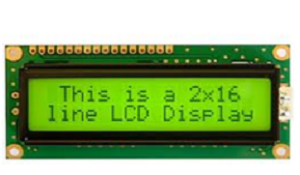
Alphanumeric LCDs are designed to display letters, numbers, and special symbols. A standard 16×2 alphanumeric LCD can display 224 different characters and symbols. However, these displays have limitations because they can only show characters of fixed sizes and formats.
Graphical LCD
Graphical LCDs overcome the limitations of alphanumeric LCDs by allowing custom graphics, symbols, and images to be displayed. They are widely used in mobile phones, elevators, video games, industrial equipment, and embedded systems.
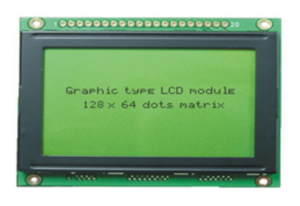
Graphical LCDs use pixels to display information, making them highly flexible for different applications. Many embedded systems use graphical LCDs to implement scrolling displays through built-in scrolling commands.
Light Emitting Diode (LED) Displays
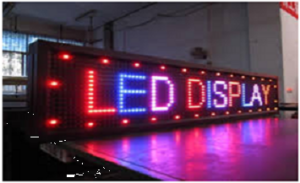
LED displays are widely used because of their compact size, low power consumption, long lifespan, and bright color output. Messages are displayed using clusters of LEDs arranged in matrix form. A matrix of interconnected LEDs is programmed to display characters and scroll messages in the desired sequence. Since scrolling messages require memory for storing text and controlling movement, microcontrollers with sufficient internal memory are commonly used.
Compared to LED displays, LCDs are generally more economical and easier to interface with microcontrollers. However, LCD displays are not easily visible from long distances, whereas LED displays provide excellent visibility even in large public areas.
Working of a Scrolling Message Display
A microcontroller controls the speed and content of the scrolling message. The display device is connected to one of the microcontroller ports. Messages can be stored in external memory devices such as EEPROM. Users can select different messages using switches or input devices.
When a specific switch is pressed, the microcontroller retrieves the corresponding message from memory and sends it to the display unit. Since a microcontroller can process only one character at a time, rapid switching of display pins is performed to create the illusion of multiple characters appearing simultaneously. This technique enables smooth scrolling of messages across the display.
Circuit Diagram for Displaying Scrolling Messages Using a PC
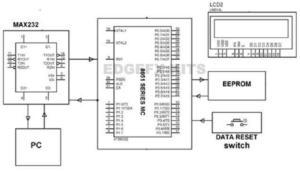
In a PC-based scrolling message display system, a computer sends information to an 8051 microcontroller through a MAX232 interface IC. The transmitted data is stored in external memory connected to the microcontroller. The microcontroller continuously retrieves the stored data and displays it on an LCD module, creating a scrolling message effect.
Applications of Scrolling Message Displays
Scrolling message displays have numerous practical applications across different industries and public services.
1. Public Information Systems
These displays are used at railway stations, bus terminals, airports, and traffic signals to provide travelers and commuters with real-time information and announcements.
2. Film and Television Industry
Scrolling text is commonly used to display credits at the end of movies, television programs, and live broadcasts.
3. Industrial Applications
Industries use scrolling message displays to communicate important information such as production updates, safety instructions, corporate announcements, and employee notifications.
4. Educational Institutions
Schools, colleges, and universities use scrolling displays to share notices, examination schedules, event information, and announcements.
5. Hospitals and Healthcare Centers
Hospitals use scrolling displays for patient information, health awareness messages, emergency notifications, and appointment schedules.
Conclusion
A scrolling message display is an effective electronic communication system used to display information dynamically and attractively. By utilizing technologies such as LED, LCD, and microcontroller-based systems, scrolling displays provide an efficient method of sharing information in public places, industries, educational institutions, healthcare facilities, and entertainment sectors. Their ability to display large amounts of information within a limited space makes them an essential component of modern communication systems.